# Kindle E-mail Address
Before you can send articles to your Kindle with Push to Kindle (opens new window), you will need to know your Amazon Kindle email address and an email address on your Amazon Kindle Approved List. This page will tell you how you can find and change these email addresses.
# Your Kindle E-mail Address
Owners of the Amazon Kindle device are provided with an email address which is linked to their device. The email address comes in two forms: @kindle.com and @free.kindle.com (although Amazon does not display the @free.kindle.com address on your management page, it is still usable).
If you're unsure what your Kindle email address is, or if you'd like to change it, you can visit Amazon's Manage Your Kindle (opens new window) page. The page which lists the e-mail address is Preferences. Once on that page, scroll down to Personal Document Settings and click on it to expand. You'll then see the Kindle addresses associated to your device(s) listed.
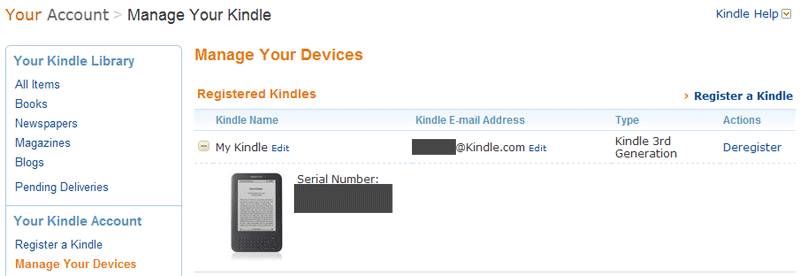
(Old screenshot)
# Approved Email Address to Send From
Amazon will only delivery articles sent to your Kindle email address if the sender's address is in your approved list (it silently discards emails which are sent from addresses not in your approved list).
So to ensure articles sent with Push to Kindle reach your Kindle, you will need to add kindle@fivefilters.org to your approved list.
To add an address to your approved list you will have to:
- Visit Amazon's Manage Your Kindle (opens new window) page.
- The section you're after is called Approved Personal Document E-mail List
- Here you'll see the existing addresses Amazon will accept documents from
- Click 'Add a new approved e-mail address'
- Enter
kindle@fivefilters.org
WARNING
Some users are reporting problems with delivery when using a custom 'send from' address. For the time being we're recommending users stick to 'kindle@fivefilters.org' as the send from address.